
You are weighing two CTR tools and need proof that the visits actually happened. For high-volume bot traffic, reported metrics are easy to publish and hard to verify, so the gap between a dashboard number and a screenshot matters more than the feature list.
This comparison gives you a clear verdict on ClickSEO versus CTRTool for high-volume campaigns. You will see how proof and transparency, channel coverage across Google, Bing, Maps and AI Overviews, and campaign controls like desktop versus mobile and daily search counts differ, then match pricing and pick the tool that fits your volume.
Quick Verdict: ClickSEO vs CTRTool for High-Volume Bot Traffic
CTRTool wins on verifiable proof and multi-channel coverage, while ClickSEO appeals only if you prioritize raw volume over transparency. For teams running CTR manipulation campaigns at scale, the difference comes down to one question: can you audit what you paid for? CTRTool answers that with documentation for every visit. ClickSEO's public claims, by contrast, remain largely unverified.
High-volume bot traffic magnifies every weakness in a campaign. When you send hundreds or thousands of automated clicks at a Google SERP, small problems compound fast. Unverifiable visits, unclear targeting, and opaque billing turn a promising ranking push into an expensive guess. That is why accountability matters more than raw click counts once volume climbs.
Here is how the two approaches stack up on the factors that matter most for large campaigns:
| Factor | CTRTool | ClickSEO |
|---|---|---|
| Visit proof | Screenshot proof for every visit, with search and landing screenshots as separate images | Claims are unverified; no documented per-visit proof described |
| Channel coverage | Google, Bing, Maps, and AI Overviews | Coverage details not clearly documented publicly |
| Visit transparency | Full visit paths, including up to 5 additional internal pages and visits up to 5 minutes | Likely volume-first, with limited transparency into individual sessions |
| Billing model | Pay-for-results credits; no credits charged for technical failures before landing | Terms are opaque from public information |
| Position tracking | Keyword positions tracked over time, including Maps listing order and AI citation order | Not clearly described |
The pattern is consistent. CTRTool is built around auditable visits with full paths, so a high-volume campaign stays inspectable at the level of a single session. ClickSEO, based on publicly available information, appears to lean toward volume without matching transparency. That trade-off may suit some buyers, but it leaves you unable to confirm what your budget actually produced.
CTRTool also spreads risk more fairly. Visits that cannot verify the requested location use no credits, and one credit balance is shared across all campaign types, websites, and keywords. With up to 100 campaigns and 100 keywords each, large operations stay manageable under a single balance. Unused credits roll over while you are subscribed, which matters when click velocity varies week to week.
Bottom line: choose CTRTool for accountability and channel breadth. Consider ClickSEO only if you accept opaque metrics and volume-first trade-offs.
At a glance: how CTRTool compares to ClickSEO on the features that matter most.
| Feature | CTRTool | ClickSEO |
|---|---|---|
| Pricing | $59-$699/mo | $30 Basic; $55 Essential |
| Free plan / trial | ✗ | Free trial |
| CTR manipulation / organic clicks | ✓ | ✓ |
| Keyword tracking | ✓ | ✓ |
| Campaign statistics / reporting | ✓ | ✓ |
| Google Search Console integration | — | ✓ |
| Global geo-targeting | Country/state/city | 170+ countries |
| Screenshot proof per visit | ✓ | — |
What Is CTRTool?
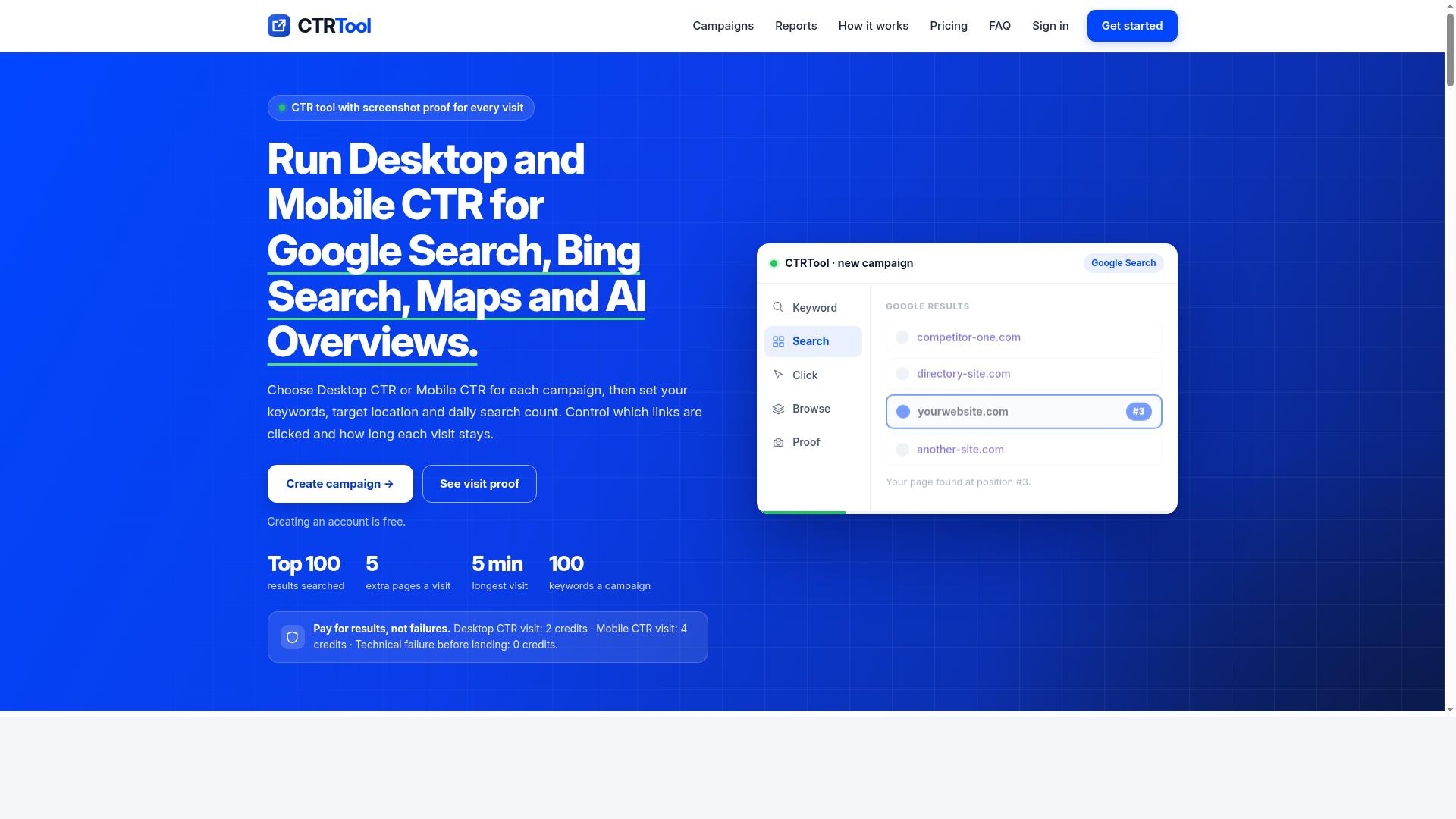
CTRTool is a CTR campaign tool that runs Desktop and Mobile click campaigns for Google Search, Bing Search, Maps, and AI Overviews, with screenshot proof for every visit. It is built for SEO teams that want click-through rate and user behavior signals delivered in a measurable, documented way rather than through opaque bot networks.
The core idea is simple. Instead of blasting clicks from a mass of untracked traffic bots, CTRTool lets you define a campaign and then shows evidence of each visit. That evidence is what separates a controlled CTR manipulation workflow from a black-box click farm.
Every visit is documented with search and landing screenshots. You can see the query as it appeared in the results and the page as it loaded, which makes the work auditable and easy to review against your keyword rankings over time.
Campaign setup follows a clear structure. Users choose Desktop CTR or Mobile CTR per campaign, then set keywords, target location, and daily search count. They also control which links are clicked and how long each visit stays, which matters for dwell time and session duration signals.
That keyword-level control is the practical difference for high-volume bot traffic. Rather than sending generic organic traffic at a domain, you steer clicks to specific queries and specific URLs, and you decide the pace of click velocity.
CTRTool also tracks keyword positions over time. That includes Maps listing order and AI citation order, so the same campaign view covers classic blue links, local results, and AI Overviews. Campaigns require the page to appear within the top 100 organic results for the chosen keyword and location, which keeps targeting realistic.
Positioning matters when comparing tools. CTRTool is transparent about limits. The site states plainly: "Automated visits do not guarantee rankings." That honesty is useful in a space where vendors often overpromise.
For readers weighing ClickSEO against CTRTool, the distinction is documentation and targeting scope. CTRTool's verified approach centers on screenshot proof, per-campaign device choice, and keyword-level parameters across four surfaces: Google Search, Bing Search, Maps, and AI Overviews.
- Proof per visit: search screenshot plus landing screenshot
- Device control: Desktop CTR or Mobile CTR chosen per campaign
- Targeting: keywords, location, and daily search count
- Visit behavior: which links are clicked and how long each visit stays
- Tracking: keyword positions over time, including Maps order and AI citation order
The takeaway for teams running high-volume campaigns is that accountability is built into the workflow, not promised after the fact.
What Is ClickSEO?
ClickSEO is a CTR manipulation service that, based on its public marketing, focuses on delivering automated clicks to influence click-through rate and SERP ranking. Its pitch centers on volume: large batches of clicks pushed toward target pages through what appear to be automated or bot-driven methods.
The core idea behind the service is straightforward. Google and other search engines treat user behavior signals as part of how results are evaluated, and a page that earns a strong click-through rate may see improved SERP ranking over time. CTR manipulation tools attempt to simulate those signals at scale.
What ClickSEO actually does under the hood is harder to pin down. Public details on its methods, proof of delivery, and channel coverage are limited, so buyers are largely asked to take the marketing at face value. That lack of transparency is the first thing to weigh before committing budget.
Based on its positioning, ClickSEO likely targets Google SERP rankings by generating click-through rate signals through automated clicks and high-volume bot traffic. Whether those clicks come from proxy networks, residential proxies, or click farms is not clearly documented in publicly available material.
Several practical questions go unanswered in its public-facing information:
- How clicks are sourced and whether residential proxies or datacenter IPs are used
- Whether IP rotation and session handling are designed to survive anti-bot detection
- What proof of delivery, if any, customers receive after a campaign runs
- Which search engines and regions the service covers
- How dwell time, bounce rate, and session duration are handled
None of these gaps prove the service fails at its job. They simply mean a buyer cannot verify the work before paying, and cannot confirm afterward that real clicks landed on the intended keywords.
The CTR manipulation category splits into two broad approaches. One leans on raw volume and automated clicks, and the other leans on verification so the buyer can see what was delivered. ClickSEO appears to sit in the first camp, judging by its emphasis on volume in public messaging.
That distinction matters because click fraud detection has improved. Search engines increasingly look at traffic patterns, behavioral fingerprinting, and engagement metrics to separate genuine user behavior signals from bot traffic. A campaign built purely on volume, with no visible proof layer, is difficult to evaluate on either effectiveness or safety.
Verification-first tools take a different route, showing evidence of each delivered click rather than asking for trust. The rest of this comparison examines how that gap in transparency plays out when the goal is sustained ranking movement rather than a one-time burst of automated clicks.
For teams weighing ClickSEO against alternatives, the practical advice is to ask the same questions of any CTR manipulation provider. Request proof of delivery, ask how bot traffic is sourced and rotated, and confirm which engagement metrics the service attempts to simulate.
Watch for red flags in the sales process itself:
- Guaranteed ranking positions with no supporting evidence
- No sample reporting or delivery proof available before purchase
- Vague answers on proxy networks, IP rotation, or CAPTCHA handling
- No clarity on how click velocity is paced to look natural
A provider that cannot answer these questions leaves the buyer carrying all the risk. That is the standard to hold ClickSEO and every competitor to, and it sets up the contrast with a screenshot-verified approach covered in the sections that follow.
Features Compared
This comparison breaks down the three areas that matter most for high-volume bot traffic: proof and transparency, channel coverage, and campaign control. Together, these factors determine whether automated clicks are auditable, broad enough to reach the right surfaces, and precise enough to look like genuine user behavior signals.
Each area is examined below using publicly available information and the documented capabilities of both platforms. Where details about ClickSEO are unavailable, that gap is stated plainly rather than filled with assumptions.
Proof and Transparency: Screenshot-Verified Visits vs Reported Metrics
CTRTool provides screenshot proof for every visit-search and landing screenshots as separate images-while ClickSEO's public materials do not describe comparable verification. Each CTRTool report also includes full visit paths and keyword positions tracked over time, covering Search positions, Maps listing order, and AI citation order.
That level of evidence changes how buyers can audit a campaign. Instead of trusting a dashboard summary, users can review the documented visit and compare it against their own keyword rankings and search console data.
- Screenshot proof: separate search and landing images for every visit
- Visit paths: the full route through the site, including internal pages
- Position tracking: keyword positions over time, plus Maps listing order and AI citation order
This matters for two reasons. First, it helps detect click fraud or failed sessions before they distort your analytics. Second, it lets you validate traffic patterns against real ranking movement rather than reported numbers alone.
CTRTool also backs its reporting with a pay-for-results model: no credits are charged for technical failures before landing, and visits that cannot verify the requested location use no credits. ClickSEO's public information is insufficient to confirm similar transparency, so buyers should ask directly what proof, if any, accompanies a delivered visit.
Channel Coverage: Google, Bing, Maps and AI Overviews
CTRTool supports campaigns on Google Search, Bing Search, Google Maps, and AI Overviews, whereas ClickSEO's public information centers primarily on Google SERP clicks. For teams running diversified ranking strategies, that difference in surface area is significant.
Here is how CTRTool's channel coverage breaks down:
| Channel | CTRTool | ClickSEO (public info) |
|---|---|---|
| Google Search | Keyword and organic result clicks, Desktop or Mobile, Top 100 results, internal pages | Google SERP clicks described |
| Bing Search | Keyword and organic result clicks, same controls as Google | No public evidence |
| Google Maps | Find business listing, click its website link, up to 50 listings, city targeting | No public evidence |
| AI Overviews | Find website in the overview, click its source link, requires a matching citation | No public evidence |
Multi-channel coverage matters because user behavior signals are no longer confined to one engine or one result type. A campaign that only touches the standard Google SERP leaves Maps visibility and AI-generated answers untouched, and those surfaces increasingly shape impression share and discovery.
The AI Overview campaign type is a useful example of precision: it requires a matching citation, so clicks route through a source link the overview actually displays. Bing coverage extends the same keyword-and-result mechanics beyond Google, which helps where desktop search share is meaningful. ClickSEO may support additional channels, but its public materials do not demonstrate it, so confirm before assuming parity.
Campaign Control: Desktop vs Mobile, Location Targeting and Daily Search Counts
CTRTool lets users choose Desktop or Mobile CTR per campaign, target a country with optional state and city, and set daily search counts. Campaigns require the page to rank in the top 100 for the chosen keyword and location, which keeps delivery tied to a realistic search path.
Beyond those basics, the controls extend to search depth up to 100, timing options (now, spread out, or with gaps), chosen days, hours, and time zone, with daily goals resetting at 00:00 UTC. Users can set target URLs, internal page URLs, and link text, plus click order and scrolling time. Each visit can run up to five minutes with up to five additional internal pages.
- Device choice: Desktop Chrome windows or real Android phone sessions matched to the target location through managed proxy routes
- Location precision: country, state, and city, or "Any country" for a mix of supported locations
- Volume pacing: configurable daily search counts with spread or gap timing
Granular control reduces wasted spend and improves behavioral fingerprinting realism. Matching device, location, and dwell time to a plausible human session is exactly what makes anti-bot detection less likely to flag automated clicks.
Public details on comparable controls for ClickSEO are unavailable, so buyers should request specifics on device targeting, geo granularity, and pacing before committing. For high-volume bot traffic, those settings decide whether a campaign is precise or simply noisy.
Pricing Compared
CTRTool publishes monthly plans with clear credit allocations, while ClickSEO's pricing is not publicly detailed in verifiable sources. That difference matters for anyone planning high-volume bot traffic campaigns, because budget forecasting depends on knowing the unit cost of each visit.
CTRTool's tiers are listed in USD on its site, with credit amounts and visit estimates shown up front. ClickSEO's commercial terms appear to sit behind a sales conversation, so readers comparing options should treat that side of the comparison as unverified until they receive a direct quote.
The H3 below breaks down CTRTool's credit model and the specific plan tiers.
CTRTool's Credit Model and Plan Tiers
CTRTool uses a credit-based model: Starter costs $59/month for 2,000 credits (up to 1,000 Desktop CTR visits or 500 Mobile CTR visits), and Growth costs $125/month for 5,000 credits (up to 2,500 Desktop or 1,250 Mobile visits). Growth is marked Recommended on the site. Two larger tiers extend the same structure for heavier campaigns.
| Plan | Monthly Price | Credits | Desktop Visits | Mobile Visits |
|---|---|---|---|---|
| Starter | $59 | 2,000 | Up to 1,000 | Up to 500 |
| Growth (Recommended) | $125 | 5,000 | Up to 2,500 | Up to 1,250 |
| Scale | $399 | 20,000 | Up to 10,000 | Up to 5,000 |
| Agency | $699 | 40,000 | Up to 20,000 | Up to 10,000 |
The conversion is simple. A Desktop CTR visit costs 2 credits and a Mobile CTR visit costs 4 credits, which is why the same credit balance buys half as many Mobile visits. A verified search without a match costs 1 credit, and a technical failure before landing costs 0 credits.
For high-volume bot traffic, this structure makes cost per visit predictable. You can calculate the exact number of automated clicks a budget supports before committing, and unused credits roll over while the subscription is active. Credits expire when cancellation takes effect.
CTRTool also notes limited launch pricing: prices rise 30% on November 15. Creating an account is free, and custom development carries a separate, agreed one-time fee.
ClickSEO, by contrast, has no public pricing available in verifiable sources. Readers weighing it against CTRTool should request a direct quote and confirm credit or visit limits in writing before comparing the two on cost.
Who Should Choose CTRTool
CTRTool suits SEO practitioners and agencies who need auditable, multi-channel CTR campaigns for their own or client websites. The platform is built for teams running CTR manipulation across Google Search, Bing Search, Google Maps and AI Overviews, where every visit needs to be defensible to a client or a compliance reviewer.
That emphasis on proof is what separates CTRTool from tools built purely for volume. When a campaign touches a client's Google SERP presence, the question is rarely just whether clicks landed. It is whether you can show where they came from, what path they took, and how the session behaved.
Three traits define the ideal CTRTool user:
- Accountability to clients. Agencies that must justify spend and activity in reporting decks, not just internal dashboards.
- Multi-channel scope. Teams managing visibility across classic search results, local packs on Google Maps, and AI Overviews at the same time.
- Multi-client or multi-keyword load. Operators juggling several properties and keyword sets who need a model that scales without renegotiating terms for every new campaign.
The credit model fits this profile well. Teams managing multiple clients or keyword groups can allocate activity across campaigns rather than committing to rigid per-site arrangements. That flexibility matters when a client adds a new location or a seasonal keyword push appears mid-quarter.
Location targeting adds another layer of fit. Country, state and city level targeting lets practitioners align automated clicks with the geographies that matter to each client, which is useful for local SEO work on Google Maps and for regional keyword rankings.
Transparency is the core value for this audience. Screenshot proof for every visit and full visit paths give account managers something concrete to reference in client reporting and in internal compliance reviews. For agencies operating in regulated niches, that paper trail is often the difference between a campaign that can be defended and one that cannot.
Practitioners who mainly want raw volume from high-volume bot traffic may find the proof-first approach heavier than they need. But for teams whose reputation rests on showing their work, the trade-off favors CTRTool.
In short, CTRTool is the stronger choice for SEO practitioners and agencies treating CTR campaigns as client-facing work rather than an anonymous experiment. The combination of multi-channel coverage, credit-based scaling, geographic targeting and per-visit evidence lines up with how professional teams actually operate.
Who Should Choose ClickSEO
ClickSEO may appeal to buyers who prioritize raw click volume on Google SERP and are comfortable with less public transparency. That framing matters because CTR manipulation is a field where claims are easy to make and hard to verify, so the fit depends heavily on what a buyer is willing to accept on faith.
In general terms, this profile describes a volume-first buyer. The primary goal is a steady stream of automated clicks against target keywords, and the buyer is less concerned with documented proof of delivery or coverage beyond a single search engine.
That trade-off deserves a clear look before any commitment. Without public details on pricing, campaign controls, or proof of clicks, choosing ClickSEO means accepting less accountability than a buyer might expect from a tool in this category. The decision rests on trust rather than on verifiable specifics.
Buyers weighing this option should ask a few practical questions up front:
- Is there any documented evidence that clicks were actually delivered as ordered?
- How are campaign settings controlled, and can they be adjusted mid-campaign?
- What happens when anti-bot detection flags the traffic?
- Does coverage extend beyond Google SERP, or is it single-channel?
Someone focused purely on click volume for Google SERP, who does not require screenshot proof or multi-channel coverage, is the closest fit for this profile. Buyers who need verifiable delivery or oversight across more than one channel will likely find the opacity harder to justify.
It also helps to think about what happens after a campaign ends. If results cannot be tied back to specific clicks or sessions, evaluating whether the spend produced any movement in keyword rankings becomes guesswork. A volume-first buyer accepts that ambiguity as part of the deal.
For readers who want proof and defined controls alongside volume, a tool built around documented delivery is the more defensible choice. The comparison below summarizes the general distinction.
| Consideration | ClickSEO (general, hedged) | What to Look For |
|---|---|---|
| Primary focus | Raw click volume on Google SERP | Volume plus verifiable delivery |
| Proof of clicks | Not publicly detailed | Screenshot or session-level evidence |
| Channel coverage | Reported as single-channel | Multi-channel coverage where needed |
| Pricing and controls | Limited public information | Clear pricing and adjustable settings |
The takeaway is straightforward. ClickSEO suits a narrow, volume-first use case, while buyers who value accountability in their CTR manipulation spend will want a tool that can show its work.
Final Verdict
CTRTool is the stronger choice for high-volume bot traffic because it pairs multi-channel coverage with screenshot proof for every visit and transparent credit-based pricing. For buyers who need campaigns they can audit and defend, that combination matters more than raw click volume alone.
The comparison comes down to four practical questions: can you prove the visits happened, can you run them across the channels you care about, can you control how they behave, and can you predict the cost. CTRTool answers all four with verifiable detail. ClickSEO remains a reasonable option only for volume-first buyers who are comfortable accepting unverified metrics.
| Decision Factor | CTRTool | ClickSEO |
|---|---|---|
| Proof of visits | Screenshot-verified visits with full paths and position tracking | Generally reported through aggregate metrics, with limited per-visit evidence |
| Channel coverage | Google, Bing, Maps, and AI Overviews | Typically positioned around standard search results |
| Campaign control | Desktop and Mobile targeting, location targeting, daily search counts | Controls vary and are usually described in broad terms |
| Pricing transparency | Starter at $59, Growth at $125, credit-based | Pricing structures are not always published in comparable detail |
Proof is the deciding factor. Screenshot-verified visits, full click paths, and position tracking let you check whether automated clicks actually landed on the target page at the intended ranking position. Aggregate dashboards cannot confirm that. When you are spending on high-volume bot traffic, per-visit evidence is what separates a measurable campaign from a hopeful one.
Control and coverage widen the gap. Desktop and Mobile targeting, location targeting, and daily search counts let you shape click velocity and traffic patterns instead of firing clicks blindly. Coverage across Google, Bing, Maps, and AI Overviews means one campaign structure can reach more than a single Google SERP.
Pricing stays predictable. The Starter plan at $59 and Growth plan at $125 are published and credit-based, so you can map spend to daily search counts before committing. ClickSEO may appeal to buyers who prioritize sheer volume, but that trade-off means leaning on unverified metrics when judging results.
For auditable campaigns, choose CTRTool. If you have questions before starting, the support email listed in the FAQ is vaibhav@autoblogging.ai.
Frequently Asked Questions
What is the main difference between CTRTool and ClickSEO for high-volume bot traffic?
CTRTool is built specifically for CTR campaigns across Google Search, Bing Search, Google Maps and AI Overviews, with screenshot proof for every visit and full visit paths so you can verify each click. ClickSEO is a broader SEO platform that includes CTR-related functionality alongside audits and other SEO features. If your priority is dedicated, verifiable CTR campaigns at volume, CTRTool is purpose-built for that job.
Does CTRTool provide proof that bot visits actually happened?
Yes. CTRTool's core selling point is screenshot proof for every visit, delivered as separate search and landing screenshots, plus full visit paths. This lets you confirm that each campaign visit occurred as specified rather than relying on aggregated reports. ClickSEO's listed features focus on SEO audits and related tooling, so if visit-level proof matters to you, CTRTool addresses that directly.
How does pricing compare between the two tools?
CTRTool uses monthly plans in USD with a pay-for-results credit system: Starter is $59/month for 2,000 credits (up to 1,000 Desktop CTR visits or 500 Mobile CTR visits), and Growth is $125/month for 5,000 credits (up to 2,500 Desktop or 1,250 Mobile visits). ClickSEO's pricing is listed by third-party sources as roughly $30 for a Basic plan and $55 for an Essential plan, with a free trial and lifetime plan noted. The right choice depends on whether you need dedicated CTR campaign volume with proof or a general SEO toolkit.
Which platforms and campaign types does each tool support?
CTRTool runs Desktop and Mobile CTR campaigns for Google Search, Bing Search, Google Maps and AI Overviews, letting you choose Desktop or Mobile per campaign, set keywords, and target by country, state and city. Campaigns require the page to appear in the top 100 organic results for the chosen keyword and location, Maps campaigns check up to 50 listings, and AI Overview campaigns need a matching source link. ClickSEO's researched feature set centers on SEO-friendly functionality and automated SEO audits, so verify its CTR-specific platform coverage directly before committing.
Can I run high-volume campaigns with location targeting in CTRTool?
Yes. CTRTool lets you target a chosen country with an optional state and city, or select "Any country" to use a mix of supported locations, and you can run Desktop or Mobile campaigns separately. Credits scale with volume, so the Growth plan's 5,000 credits support up to 2,500 Desktop or 1,250 Mobile visits per month. This makes it straightforward to scale bot traffic campaigns while keeping targeting precise.
Which tool should I choose for SEO and agency work?
CTRTool is aimed at SEO practitioners and agencies running CTR campaigns for their own or client websites across Google Search, Bing Search, Maps and AI Overviews, with keyword position tracking over time including Maps listing order and AI citation order. ClickSEO, based on its listed features, leans toward broader SEO auditing and optimization. Many teams use a general SEO platform for audits and a dedicated CTR tool like CTRTool for verifiable campaign execution, so the two can complement each other.
Your insight about love are deep and I’m ready to read more of your blood post currenty subscribed
Thank you very much for your words and feedback! I am looking forward to sharing more content for you to read. Thank you for your subscription.